Recently I needed to deploy a couple of fairly simple containers to AWS to complete a database (RDS), API and dashboard stack. At the start of the project, we were planning to use AWS App Runner to keep things fairly simple - two weeks later it’s deprecated. We fell back to ECS Express Mode which AWS are pushing fairly hard in the console and is the official replacement for App Runner.
To jump to the conclusion of this post: after some time fighting it, we had to ditch Express Mode and deploy vanilla ECS Services. For a while, I assumed this was a PICNIC problem and kept trying ways to make Express Mode work. I mean, if AWS are pushing it heavily then it should be good, right? It was only when I found this blog post by Kirill Shirinkin that I thought about ditching Express Mode and not long later everything was working perfectly with vanilla ECS. I agree with pretty much everything Kirill posted so I’ll just add my own issues below.
What I needed to deploy
I had a few core requirements:
- The whole stack is built with OpenTofu/Terraform, and needs to be fully IaC.
- It needed to be serverless, we didn’t want to manage EC2 instances etc, hence defaulting to App Runner and falling back to ECS Express Mode.
- I needed to deploy two containers, a dashboard and an API. The dashboard needs to access the API to fetch data, end users want direct API access as well.
- I needed to add some firewall-type rules to restrict access from the whole internet down to a known, public CIDR block. There is authentication but this was a key requirement to reduce the attack surface.
I think this is a fairly simple and common setup, obviously it could be simpler with only one container, but it’s nothing crazy and definitely a long way from needing Kubernetes etc. It’s also low traffic, so scaling etc didn’t really play into decision making. The key thing we actually wanted was simplicity.
First issue: (mostly me)
I will say it’s fairly simple Terraform to create an ECS Express Mode service. Once the Terraform stack was applied, I went to the console and saw my newly created service. We get a generated hostname .on.aws with provided HTTPS which is nice!
The Express service page shows things in green, with 1 running task. Looks okay!
There is a ‘Rollback Failed’ when I dig into the Deployments tab but this is newly created so I don’t expect a rollback to work?
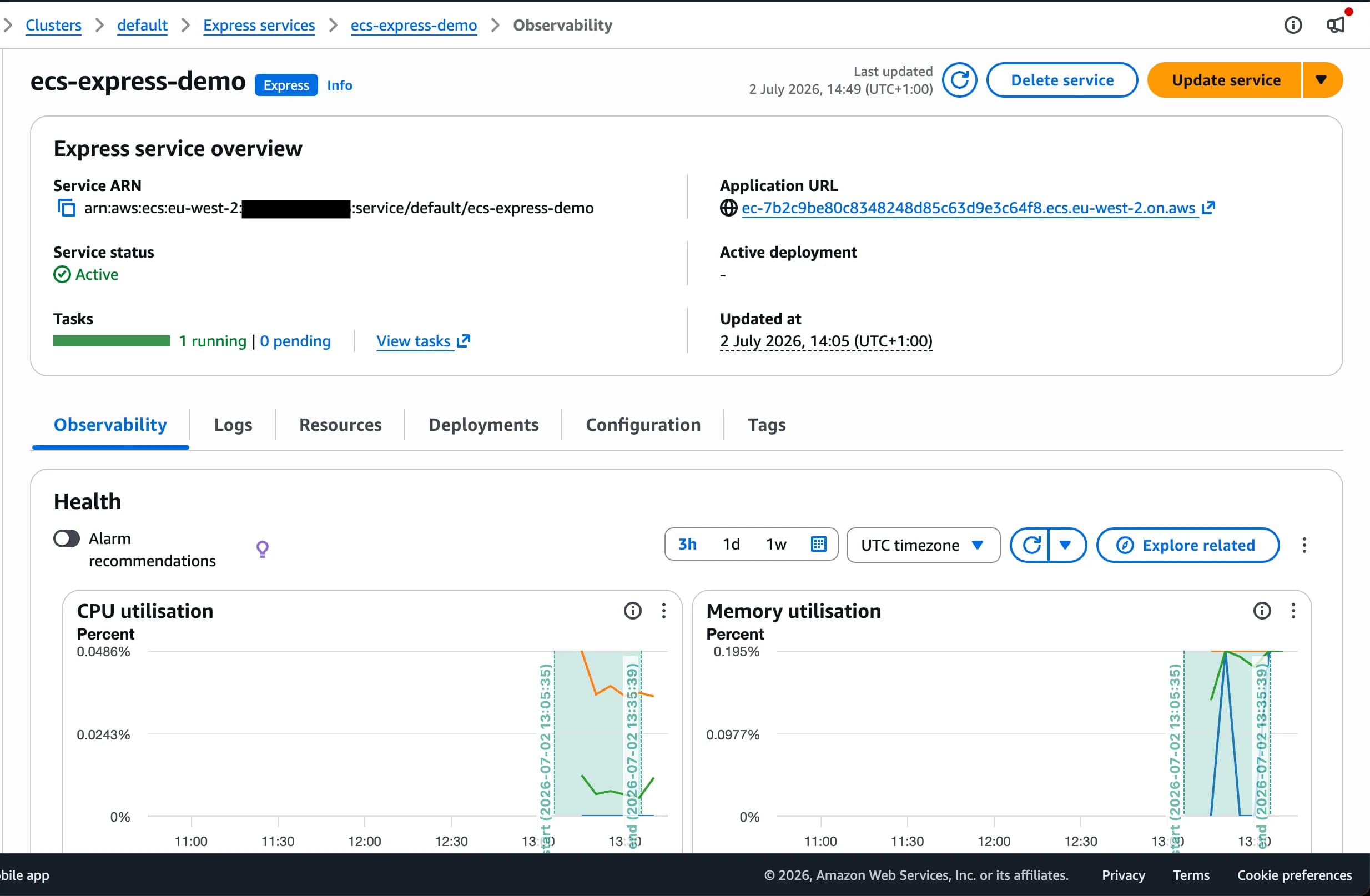
I visit the url. 503 Service Temporarily Unavailable, huh. Nothing in the Express service console showed any obvious errors.
At this point I have a hunch what is up, it’s a 503 error that doesn’t look like it’s coming from my container. I suspect the load balancer isn’t seeing the service as healthy, so isn’t routing any traffic to the container.
Sure enough, when I visit EC2 > Target Groups and find the appropriate resource, the target group reports my container has an unhealthy status! Whoops, this is my fault. My API returns 404 on the root / URL, as I have a /health endpoint - I never set this up in the Express service.
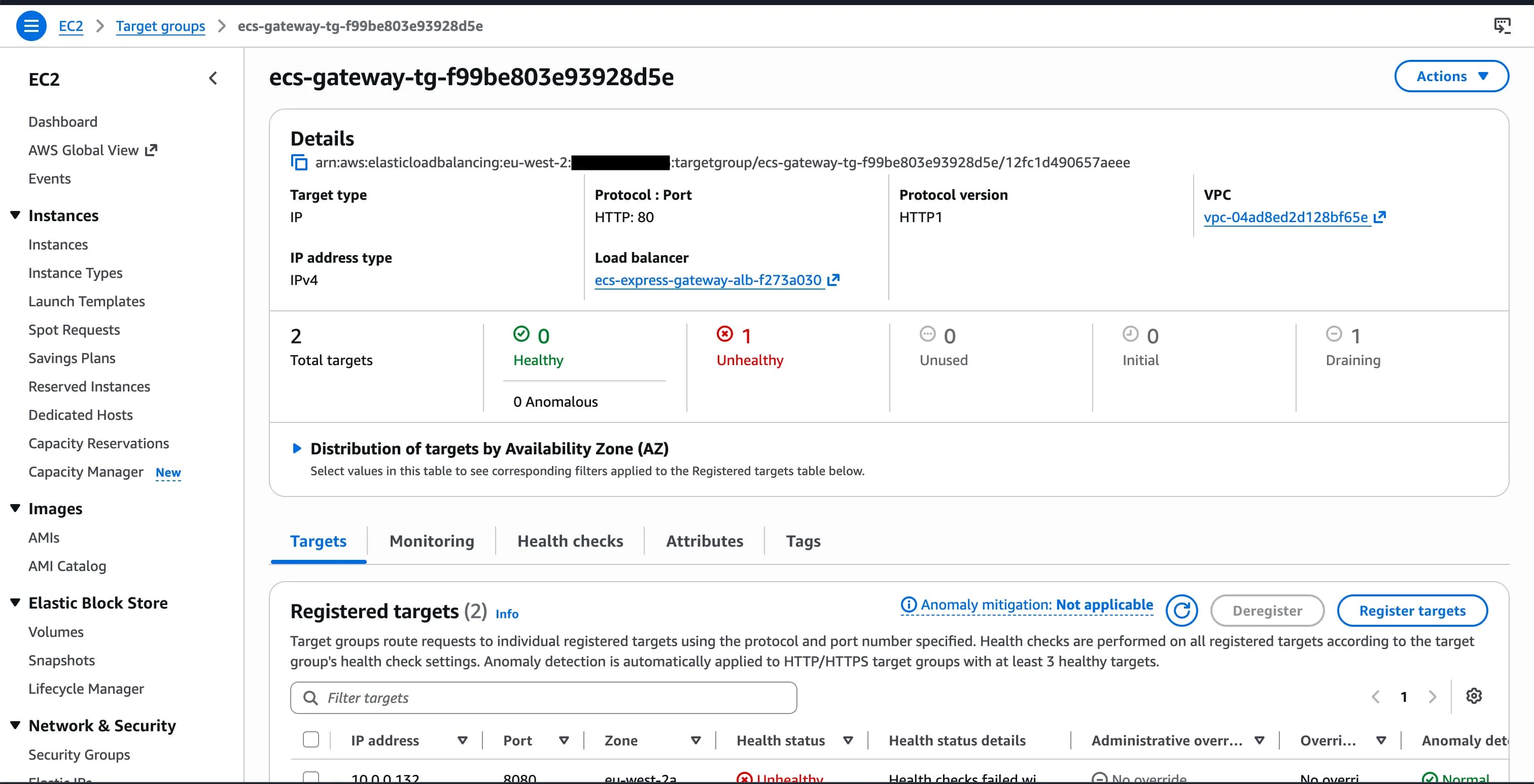
Thankfully for me, my web server prints 404s to the container logs, so I could confirm this pretty easily and see my load balancer hitting the root endpoint. Not all frameworks print 404s so this could be quite hard to diagnose. It didn’t take me too long to work this out, as I was familiar with ALBs/target groups and health checks, but if I was new to AWS and was hoping Express Mode makes things ‘easy’ for me then I’d be struggling - nothing in the Express Mode UI indicated that the health checks were failing which is pretty poor in my opinion. The abstraction provided by Express Mode has made things harder here and not easier. To be fair, adding health_check_path = "/health" into my IaC fixes it straight away.
More health check issues…
Once things were up and running, I started making some changes to my API, rebuilding the container image and pushing up to ECR. Top tip: thanks to a cheeky little thing called ECS ‘version consistency’, ECS remembers your image digest at deployment time and keeps using that image, even if you push to latest and stop running tasks. Forcing a new deployment makes ECS pull your image from the tag again. So get into a little routine of running update-service --force-new-deployment. Any time lost to this is probably my fault.
What I’m not so keen on is that my new deployments kept spinning for many hours. I could see an old task from the previous deployment and one from the new one, but it wouldn’t finish? I think I’ve worked this out to be something related to the newly ‘simplified’ deployment strategy.
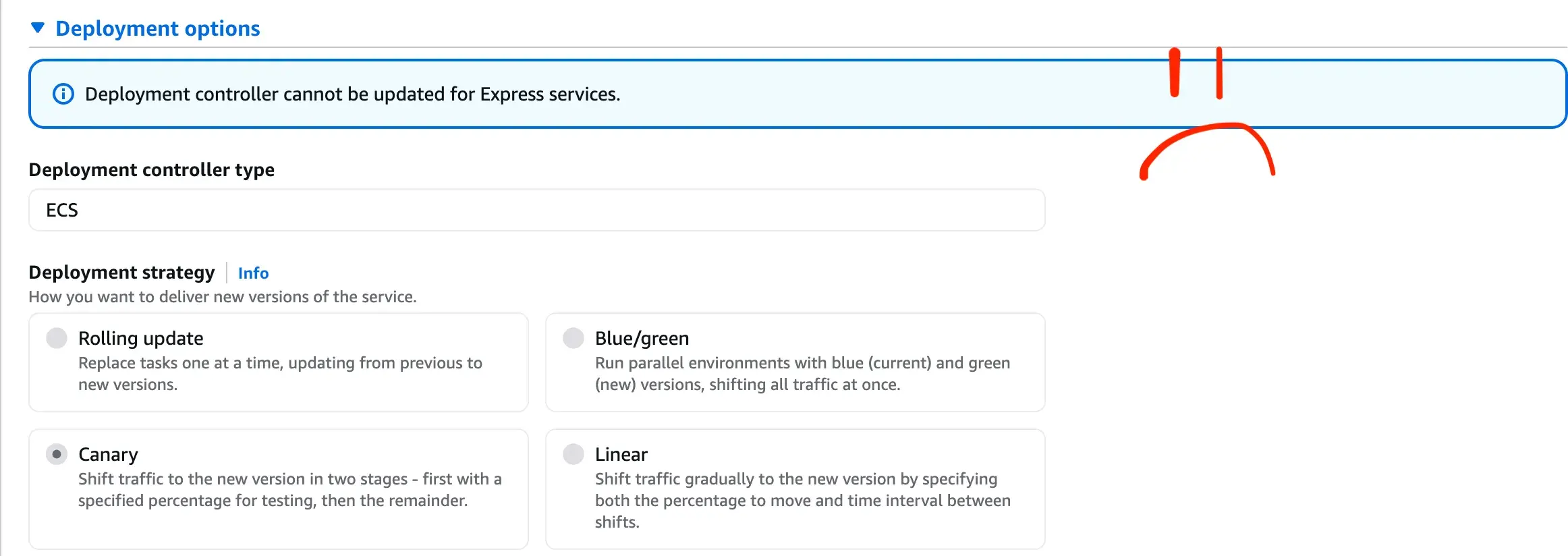
With ECS Express Mode, a canary deployment is employed. 5% of traffic is sent to the new deployment (new task). Responses are monitored and rolled back on failures, and after a 3 minute bake time, 100% of traffic is sent to the new container. In practice, I have seen deployment times of many hours, even though the task logs show the container started in less than 60s.
How did I manage to get the deployment to finish? I’m not completely sure - but it seemed like spamming the app via the public URL for a few dozen requests gives it enough traffic to finish the canary deployment. This feels like a bug, as the deployment should succeed without error rates, but I haven’t found enough information to prove it. Whatever the case, the canary deployments are not for me. I definitely don’t have enough traffic for a 5% canary; I’d be very happy with simple rolling updates. Sadly, ECS Express Mode doesn’t let you configure this. It even shows you the alternative deployment strategies in the console but greyed out! :(
Security Groups
Okay niggles with health checks out of the way, there are bigger issues that made me move away from Express Mode.
We have a requirement to ‘firewall’ our inbound traffic to a certain CIDR range (e.g. my house). Application Load Balancers and Fargate tasks are VPC resources, so my first port of call was Security Groups. I typically do this kind of thing to reduce SSH access to EC2 instances etc. The Terraform resource for ECS Express services has a network_configuration block, which allows security groups.
The exposed security_groups argument is only for the ECS tasks; we can’t control the security groups on the load balancer via Terraform. After some poking around, Express Mode adds a security group rule to the ALB to allow access on ports 80 and 443 on the ALB from anywhere, and allows traffic to the ECS task from the load balancer’s security group (sensible). So our security_groups block only allows us to permit traffic to reach the tasks from additional sources other than the ALB.
Security groups are additive, so for us to lock down the ALB, we would need to remove the SG that Express Mode has added. This brings us onto issues raised by Kirill in his post - can we import the generated ALB and remove the SG? The Express Mode docs say that the underlying resources are visible in your account and that you can modify them but it might affect how Express Mode operates: AWS describes this as the ‘shared responsibility model’. I would describe this as ‘I don’t know if editing this will screw it up’ model. It’s not clear from the docs what I can and cannot safely edit. The real challenge with the security group is if Express Mode added it back during an update, even if it left my own SGs, I would still have exposed my ALB because the rules are additive. I would only be happy to take this approach if I could stop the default inbound open rule from being added to the ALB in the first place. I don’t think it would be tricky for AWS to allow this to be configured, but at the minute, it doesn’t seem possible.
How else could we lock it down?
We have some other options for controlling access to the ALB. AWS WAF integrates with Application Load Balancers, so we could instead add some WAF rules to filter down to my chosen CIDR block.
I persevered to the point of looking at adding some WAF rules, until I realised I needed to allow access to my API from my dashboard task. If that traffic is going over the internet (through WAF), the IP of the task will be whatever public IP got assigned to it, which we don’t know in general. It’s not predictable and therefore not great for adding to the WAF rule. At this point we can smell that the architecture isn’t right, going out over the public internet for this traffic isn’t going to end well for us.
Yes, we could be running these in a private subnet so with a NAT Gateway it would be a predictable IP, but: NAT gateway is really expensive compared to two potato sized Fargate tasks, and the boomerang public internet is a smelly design.
Internal cluster traffic
We are at a bit of a deadlock in wanting to filter our traffic with a WAF and needing to allow requests from our dashboard container.
It’s worth admitting at this point, this probably would have tripped me up with AWS App Runner too. I think there would have been a solution, but it’s moot because it’s deprecated now!
Instead of sending our internal cluster traffic out via the internet and back, let’s look at networking our tasks directly. They’re inside the same subnet so the actual connectivity isn’t tricky - we just need to find the IP addresses that get assigned to the ECS tasks. AWS has a solution that solves this exact problem called ECS Service Connect! Hooray! We can use Service Connect to assign internal hostnames to our tasks, and they can communicate to each other on private networking which means it’s much easier to control external access to our stack.
Small problem. You can’t use ECS Service Connect with ECS Express Mode. Despite the fact that Express Mode is advertised to autoscale to more ALBs if you add more than 25 services, you can’t use the first-party solution for internal networking. Can you imagine running 25+ services and not having any talk to each other? This was the final nail in the coffin for me - I ripped out the Terraform for Express Mode, and very quickly I had internal traffic via Service Connect, and an ALB with whatever security group I liked, and deployments were much simpler.
If you can’t tell, I’m not a fan of Express Mode. Thanks for making it through this post - it was cathartic for me.
Appendix: Custom Task Definitions
While I was writing this post, AWS announced support for custom task definitions in Express Mode, which is useful if you want to reuse a task definition from existing infra. This doesn’t really give you much more control over Express services, the task definition is mostly passed through from the Express service anyway.